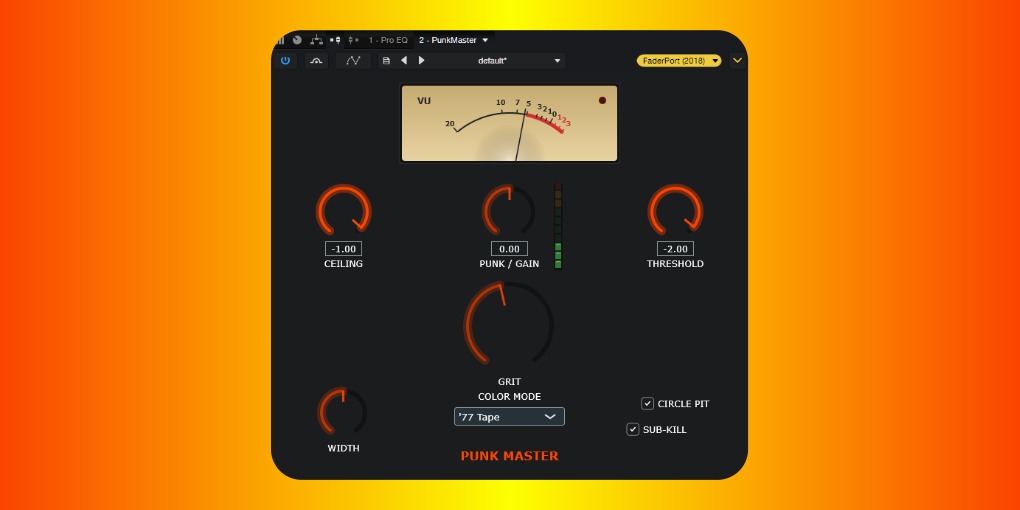
Punkmaster Guide
Hell yeah! Are you ready to blow up your mix and take it to the next level? Then this is the plugin for you. PUNKMASTER by Jimmy Flame for Atomic Grease Studios!
Controls
- Ceiling: limits maximum decibal level.
- Punk/Gain: input gain.
- Threshold: detrmines when the effect kicks in.
- Width: mono/stereo expander.
- Grit: saturation/distortion control.
- Dropdown (color mode): 3 subtle color variations.
- Circle Pit: LPF smoothing (subtle).
- Sub-Kill: HPF smoothing (subtle).
Best Practices
PUNKMASTER at it's core is an extreme limiter and saturation enhancer. Before engaging, make sure your mix is finished and the final raw EQ is settled. That includes your low-end slope, preferably steep (24 dB/oct minimum) around a higher range of 35-50Hz (you can push up to the 60-80Hz range using a gentler slope for a slightly smoother overall sound). Slightly cut the junk highs around 10-15kHz (it helps Circle Pit do it's job better).
Ceiling
This is the maximum level that can pass through the Master Bus. Typically, you want this set to less than 0.0 (-1.00 is common). However, I've tested pushing it to 0.0 dozens of times and have yet to detect any transients or weird audio artifacts getting through. That single decible makes a world of difference in terms of overall loudness. Punk is supposed to be loud so push it! Try your mix at 0.0. Note: the default is -1.00 setting.Punk/Gain
This is the input volume. No need to really mess with it unless your mix is way too quiet or loud.Threshold
This is where the processing kicks in. The default -2.00 is good for most normal mixes, but you will want to adjust based on input volume. Louder mixes should start closer to 0.00 and quiter mixes can come down to like -3.00 and so on. Lastly, if you detect "pumping," either adjust the low end on your EQ or more preferably, turn it back towards that -2.00 default. In general, I tell people to leave this alone.Width
The default is regular L+R stereo. The further you go counterclockwise the more mono it gets. Turning clockwise expands to sound wider. Reset to regular stereo by setting it to 12 O'clock.Grit
Turn up the saturation and distortion! Go ahead and experiment.Dropdown (Color Mode)
The default '77 Tape is tuned for most punk recordings. The other two settings give a slight mid and high boost. Note: if your mix is already solid and the EQ is good, you probably won't hear any changes. This particular setting is not dynamic like the others and serves more as a ceiling for sound color than anything else.Circle Pit
I usually just leave this checked on. It catches stray screeches and tames them without hiding anything sonically. Super subtle difference, and if you don't hear a marked change, it's because your mix is handling the high end pretty well.Sub-Kill
Like Circle pit, but catches stray wobble from the low end. If you don't hear a big difference, your mix is doing a great job in not letting those low sub frequencies pass through.Attention!
Remember the platitudes of mastering: 1) bad mixes become really loud bad mixes when using mastering software (same with crappy EQing); 2) processing hears the stuff your ears can't; 3) usePUNKMASTER at the very end of your mixing chain. This should be the last thing your mix hits before export.
PUNKMASTER was designed to be super dumb. By that I mean most can get great results simply by using it. My goal was to make a solid plugin that any punk band could throw on the end of their chain and get instant loudness and polished grit without spending tons of time milling through frequencies. The bottom line is, get a good mix going, don’t allow a ton of bass you can’t really hear anyway to get through, pop this sucker in and BLAM! Instant PUNKMASTER mayhem!
Note: You must unzip (extract) the downloaded folder. Save the root folder (PunkMaster.vst3) to C:\Program Files\Common Files\VST3 and make sure your DAW is fetching VSTs from that folder. The biggest problem I’ve seen is people trying to just save the actual VST from inside the folder — it won’t work! PUNKMASTER needs to communicate with the json file (yeah, inside another folder that’s inside the root folder!) in order to work. This isn’t some bullshit static binary plugin! Haha… Just kidding. I love my static binary plugins. But this ain’t it! So, don’t be comin’ at me if you didn’t even set it up right in the first place. Pow!